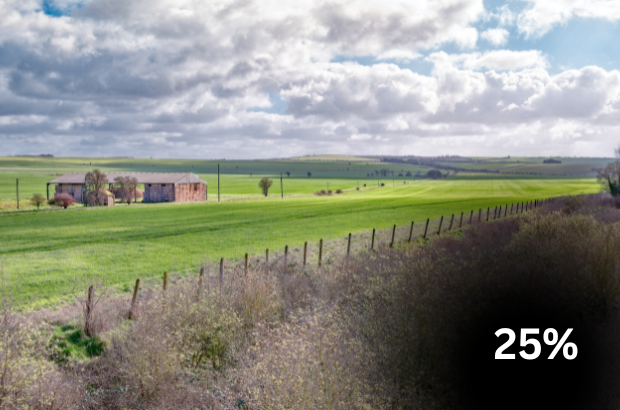
As part of our commitment to keep you informed about the progress of the Sustainable Farming Incentive 2026 (SFI26), we said we would publish updates as funding is allocated.
We can confirm that around 25% of the £233 million Window 2 budget has now been allocated, based on applications received so far.
We will continue to monitor demand closely and intend to publish further updates when approximately 50% and 75% and of the Window 2 budget has been allocated.
Please subscribe to the Farming Blog to receive an email notification when we provide further updates on budget allocation.
Apply now
Window 2 is open to farmers and land managers who, at the point they start an application:
- are registered with the Rural Payments Agency (RPA) so have a Single Business Identifier (SBI)
- have at least 3ha of eligible agricultural land linked to that SBI
This includes those with existing ELM revenue agreements that expire by the end of February 2027.
You can find the full eligibility criteria for Window 2 in the SFI26 scheme rules and guidance on GOV.UK.
Farmers and land managers who were eligible in Window 1 but didn’t submit an application can also apply in Window 2.
Read section 7 ‘Get ready to apply’ in the SFI26 scheme rules and guidance for more information.
Processing times
The RPA is processing submitted applications as quickly and efficiently as possible.
Applications are processed in the order in which they were submitted. Some applications require additional checks and can therefore take longer to assess.
We will provide an update on when successful applicants can expect to receive their agreement offer in due course.



16 comments
Comment by Tim Allen posted on
Hi, what happened to the “start an application early” functionality for Countryside Stewardship agreements ending December 2026? I don’t seem to be able to apply any options on land currently under a countryside stewardship scheme?
Comment by Tom Goss posted on
Hi Tim,
Given the speed at which budget is being allocated, if the system prevents you from applying for a combination SFI actions which you should be able to apply for on the same available area within a land parcel, you need to:
• email us at ruralpayments@defra.gov.uk as soon as possible – use ‘SFI26’ in the subject heading and include your Single Business Identifier (SBI)
• attach clear screen shots of what you’re seeing to your email
• explain what steps you took before you were prevented from applying
We will then contact you to outline next steps.
Thanks,
Tom
Comment by Tom posted on
I believe there is a significant flaw with the current application system as the 'underlying' mapping/data is not showing the correct available area. For example:
10Ha field of which there are say 3Ha in AB1 and then 2Ha in AB16 (Mid Tier Options) in an agreement which expires 31st December 2026. Balance of field is obviously 5Ha.
Application system is limiting applicant to 5Ha under some SFI actions and yet offering the full area against others. In all cases it should be the full field area that is available because the agreement is expiring.
Is the RPA aware of this issue? Cant telephone as 70 plus people in the que and now offering a call back service.
Comment by Tom Goss posted on
Hi Tom,
If the system prevents you from applying for a combination SFI actions which you should be able to apply for on the same available area within a land parcel, you need to:
• email us at ruralpayments@defra.gov.uk as soon as possible – use ‘SFI26’ in the subject heading and include your Single Business Identifier (SBI)
• attach clear screen shots of what you’re seeing to your email
• explain what steps you took before you were prevented from applying
The RPA will then contact you to outline next steps.
Thanks,
Tom
Comment by Charlotte Curtis posted on
Struggling with land use errors and cant get through on the phone, how fast are the RPA processing land use changes if sent through today?
Surely we should be able to do this on the update land use section?
Comment by Tom Goss posted on
Hi Charlotte,
If the system prevents you from applying for a combination SFI actions which you should be able to apply for on the same available area within a land parcel, you need to:
• email us at ruralpayments@defra.gov.uk as soon as possible – use ‘SFI26’ in the subject heading and include your Single Business Identifier (SBI)
• attach clear screen shots of what you’re seeing to your email
• explain what steps you took before you were prevented from applying
The RPA will then contact you to outline next steps.
Thanks,
Tom
Comment by Claire Hendy posted on
Why is the system allowing me to start an application but as soon as it comes to selecting the land for my chosen options the system says there is a problem?
Comment by Tom Goss posted on
Hi Claire,
If the system prevents you from applying for a combination SFI actions which you should be able to apply for on the same available area within a land parcel, you need to:
• email us at ruralpayments@defra.gov.uk as soon as possible – use ‘SFI26’ in the subject heading and include your Single Business Identifier (SBI)
• attach clear screen shots of what you’re seeing to your email
• explain what steps you took before you were prevented from applying
The RPA will then contact you to outline next steps.
Thanks,
Tom
Comment by Richard Betton posted on
Can an element of the window 2 budget be ring fenced for SFI agreements that are currently live but terminate before the end of February? Basic fairness should not allow those farmers who embraced the concept of ELM when SFI first became available to be disadvantaged.
Comment by Tom Goss posted on
Hi Richard,
We introduced new functionality in the SFI26 application service for Window 2 to help farmers and land managers with eligible ELM revenue agreements that expire on or before 28 February 2027. This allowed these farmers and land managers to apply for the full range of available SFI26 actions on land in their existing agreement before it expires. Usually, they would have to wait until their existing agreement ended before being able to do this.
The new SFI26 Window 2 SAE functionality allowed these farmers and land managers to ‘start an application early’ (SAE) for SFI26 in Window 2, apply for the full range of SFI26 actions on land in their expiring agreements, and accept an SFI26 agreement offer, with the SFI26 agreement starting after their relevant eligible expiring ELM revenue agreement ends.
Hope that helps,
Tom
Comment by Will posted on
Hi Tom,
How do we access the SFI26 Window 2 SAE functionality?
our mid tier ends in december this year but we aren't able to put anything on the land.
Thanks
Comment by Tom Goss posted on
Hi Will,
If the system prevents you from applying for a combination SFI actions which you should be able to apply for on the same available area within a land parcel, you need to:
• email us at ruralpayments@defra.gov.uk as soon as possible – use ‘SFI26’ in the subject heading and include your Single Business Identifier (SBI)
• attach clear screen shots of what you’re seeing to your email
• explain what steps you took before you were prevented from applying
The RPA will then contact you to outline next steps.
Thanks,
Tom
Comment by William Stacey posted on
Hi Tom, emailed this morning but havent had a response.
Comment by Tom Goss posted on
Hi William,
The RPA will contact ‘started but not submitted’ Window 2 farmers in due course to confirm whether their applications will be withdrawn, or they’re in an exception group and can continue with their application.
Thanks,
Tom
Comment by Luke Ralli posted on
Currently unable to get on the RPA site!! A very stressful morning!
Comment by Tom Goss posted on
Hi Luke,
If the system prevents you from applying for a combination SFI actions which you should be able to apply for on the same available area within a land parcel, you need to:
• email us at ruralpayments@defra.gov.uk as soon as possible – use ‘SFI26’ in the subject heading and include your Single Business Identifier (SBI)
• attach clear screen shots of what you’re seeing to your email
• explain what steps you took before you were prevented from applying
The RPA will then contact you to outline next steps.
Thanks,
Tom