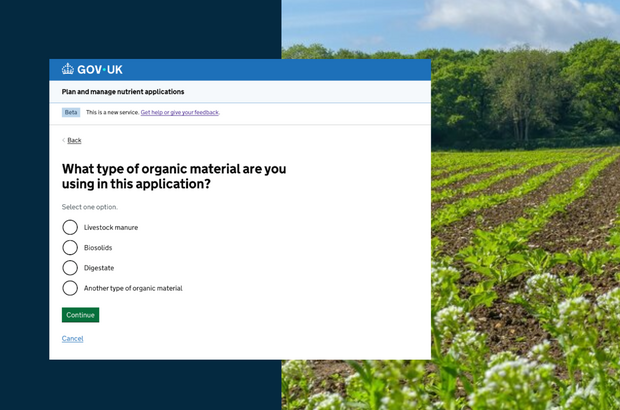
Managing nutrients is one of the most important jobs on a farm. It affects crop performance, input costs and how farming impacts the environment.
Apply too little and crops won’t reach their potential. Apply too much and fertiliser, slurry and other organic materials are wasted, costs rise, and the risk of nutrients running into rivers and streams increases.
Good nutrient planning helps you get the best from your crops, keeps costs down and reduces harm to the environment.
To make this easier, we’ve created a new online tool: the Plan and Manage Nutrient Applications Tool.
The tool builds on the existing PLANET and MANNER-NPK tools.
Defra developed it with independent provider of agricultural and environmental advice, ADAS (who created PLANET) and RSK Business Solutions Ltd with support from the Agriculture and Horticulture Development Board (AHDB).
Farmers and advisers tested it on real farms over several months, helping shape a tool that works in practice.
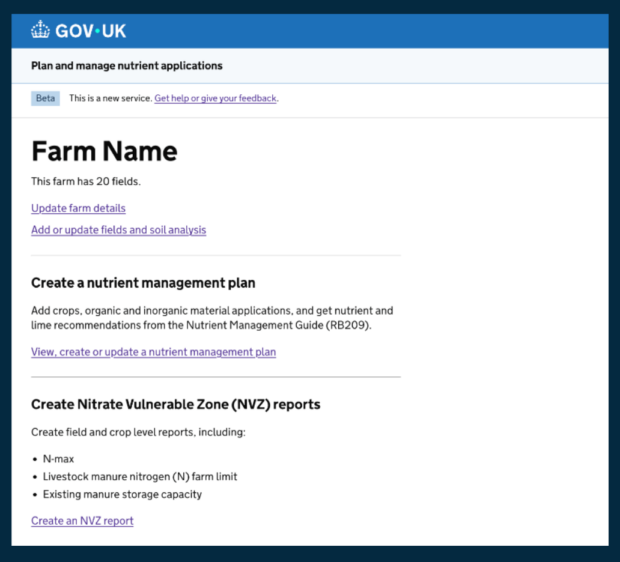
The tool uses the latest RB209 guidance (the Nutrient Management Guide) to calculate nutrient recommendations using your own farm data, such as soil analysis and expected yields.
By following the recommendations, you can reduce over-application, cut waste and make sure every bag of fertiliser or load of slurry contributes to crop growth.
Because it’s online, there’s nothing to install. Once you’ve set up your farm and fields and entered your soil type and soil analysis, the tool can pull in local data from your postcode automatically, including rainfall and altitude. You can also adjust the rainfall figure if needed.
It then guides you to nutrient recommendations across a wide range of crops, including arable, grassland, horticulture and permanent crops, and it can be used for organic and regenerative systems too.
The tool takes account of factors such as soil type, previous crops and the environmental setting of your farm, helping you make well-informed decisions efficiently.
Your data is stored securely. In future updates, you’ll be able to import farm data from PLANET to help set up your plan.
Not all data will transfer at first, but we’ll expand this over time so you can build on your plans year after year.
You can also share reports with advisers, tenants, or for compliance purposes. No data will be shared directly for compliance monitoring.
If your farm is in a Nitrate Vulnerable Zone (NVZ), you can confirm this in the tool. It will then produce the correct compliance reports, giving you confidence that your nutrient planning meets regulatory requirements.
It's free to use. We’re launching it in England and Wales first, with Scotland following in 2026.
Join the explainer webinar
On Wednesday, 4 March, ADAS will run a free webinar explaining how the tool works.
As you start using it, we welcome your feedback in the comments below. Your input will inform improvements.
The tool has been built and tested with farmers and advisers, and we’re keen to see it used on farms across the country.





 The
The 
10 comments
Comment by Martin Griffiths posted on
Being in Wales why do I need a DEFRA account?
Does it recognise CoAP rules and requirements?
Comment by Sarah Stewart posted on
Hi Martin,
Thanks for getting in touch. Yes - I checked with the team, and the Welsh CoAP regulations refer to RB209, which the tool uses.
GOV.UK One Login is a secure way to sign in and prove your identity online to access a range of UK government services. Over time, it will replace other sign-in methods, including Government Gateway. In the past, people often needed different accounts and passwords for different government services, and had to repeat identity checks each time. One Login brings this together into a single, secure account.
Best wishes,
Sarah
Comment by Mrs M Richardson posted on
Does this nutrient farm management plan have to be signed off by FACTS qualified professional?
Comment by The Team posted on
Hello Mrs Richardson,
Thanks for getting in touch. It only needs to be signed off by a FACTS qualified adviser if you are completing a nutrient management assessment and producing a review report for action NUM1 in your Sustainable Farming Incentive (SFI) agreement: https://www.gov.uk/guidance/how-to-do-the-sfi-actions-for-nutrient-management
If you aren't in SFI or required to do this in an SFI agreement, you do not need a FACTS adviser to sign your Nutrient Management Plan (NMP).
You might still choose to reach out to you local FACTS adviser if you want help taking soil samples to check your current soil pH and nutrient levels. They can also help look for any cost savings and look at how to get the best value possible from both your organic and inorganic fertilisers: https://www.basis-reg.co.uk/find-an-adviser
Hope that helps,
The Team
Comment by Wilson Boardman posted on
How will this tool account for a switch from soil applied to high efficiency foliar ( sprayed ) Nitrogen and Phosphates?
Comment by The Team posted on
Hi Wilson,
Thank you for your question, you raise an important point. The tool doesn't account for a switch at the moment, but if you'd like to discuss this further with the team to help inform future improvements, you can e-mail helpdesk@rsk-bsl.co.uk and you can sign up to the ADAS webinar on 4 March: https://register.gotowebinar.com/register/7560349058235749720
Best wishes,
The Team
Comment by Terry Lobb posted on
Can you transfer field details from the RPA site ?
Comment by Sarah Stewart posted on
Hi Terry,
No — you'll need to set up your farm and fields in the tool. Once this is done, the information is saved, so you won't need to set it up again next year.
Best wishes,
Sarah
Comment by Kim Hemmings posted on
Is it possible to import your own soil and manure analysis rather than using standard RB209 figures that can be inaccurate. With risks to water very high, applications need to be as accurate as possible.
Comment by The Team posted on
Hi Kim,
Thank you for your question, what a great point you raise. Yes you can input your own soil and manure analysis manually rather than standard values. When applying manures to your plan, if you select a common manure type such as cattle manure, it will ask if you want to use standard values, or you can enter your own manure analysis values - you need to choose this option. These manually added values are then saved to use later when you come to select that manure type again.
If you need anymore help with the tool, you can e-mail helpdesk@rsk-bsl.co.uk or you can sign up to the ADAS webinar on 4 March explaining how the tool works: https://register.gotowebinar.com/register/7560349058235749720
Hope that helps,
The Team